Cloudflare Workers: A Practical Primer for Engineers
Cloudflare Workers: A Practical Primer for Engineers
William R. Kassebaum, PE | October 2026
A lot of useful software is small. A vendor’s webhook has to be checked and passed along. A tool needs a thin API in front of it. Two services need a bit of glue between them. The code for jobs like these is rarely the hard part. The hard part is deciding where it runs and who keeps that server patched and up.
Cloudflare Workers is one answer. You write a small function, Cloudflare runs it on its global network, and there is no server for you to run. That trade comes with rules, and the rules are what this primer is about. Whether you are an engineering client reviewing a proposal, a small firm deciding what to build, or a peer who builds tools, the goal is to give you enough of the model to judge when Workers fits the job and when it doesn’t.
We checked every fact below against Cloudflare’s developer documentation in October 2026. A short video covers the same ground if you’d rather watch first.
Video: How Cloudflare Workers are used, a two-minute primer from Kassebaum Engineering.
Download or watch the video (MP4)
Here is one way we use Workers ourselves. A small Worker of ours wakes a bookkeeping agent when someone posts in a team chat group: it checks a shared secret, drops messages from bots, keeps a dedupe key and a daily cap in KV, and only sends a short “wake,” never the message text. A cron trigger runs every minute to flush held wakes and retry failures with backoff. It is part of a larger setup where coding agents review each other’s work, which we describe in Agents Checking Agents.
What a Worker Is
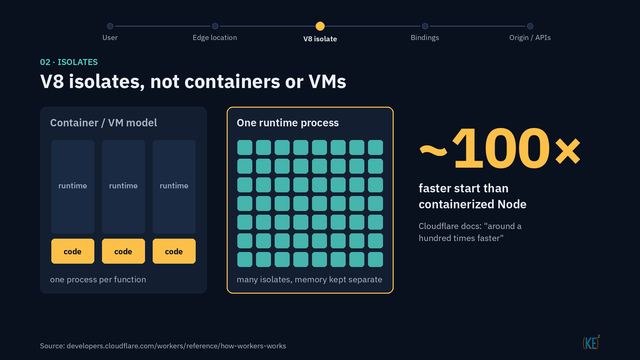
Workers run your code on Cloudflare’s global network, in hundreds of locations, so a request is handled close to the user who made it (How Workers works). Each Worker runs in a V8 isolate, the same sandbox technology behind Chrome tabs, not in a container or a virtual machine. One runtime process can host hundreds to thousands of isolates, with memory kept separate between them.
That design is the reason startup is fast. Cloudflare’s documentation says an isolate starts “around a hundred times faster than a Node process on a container or VM.” We read that as the vendor’s own approximation, not a benchmark. The practical point holds either way: you are not paying to boot a machine every time a request shows up.
The Programming Model
A Worker is a fetch handler. It takes a standard Request and returns a Response (Handlers):
export default {
  async fetch(request, env, ctx) {
    return new Response("Hello");
  },
};
If you have written code against the web Fetch API, this will look familiar. The env argument is where your bindings arrive, which we cover below.
JavaScript, TypeScript, Python and Rust are first-class languages. Python needs the python_workers compatibility flag (Python Workers). C, C++, Go, Kotlin and others compile to WebAssembly (Languages).
HTTP is not the only way in. Workers can also be triggered by cron schedules, queue messages and inbound email (Handlers).
State Lives in Bindings
A Worker doesn’t keep state on its own. It reaches storage and other services through bindings. A binding is both a permission and an API, handed to your code as env (Bindings). If a binding isn’t configured, your code can’t reach that resource. We like that: what a Worker is allowed to touch is written down in one place.
The main options:
| Binding | What it is | Notes |
|---|---|---|
| KV | Eventually consistent key-value store | Writes can take 60 seconds or more to reach other locations. Good for config and caches. |
| D1 | Managed serverless database with SQLite semantics | Relational data |
| R2 | S3-compatible object storage (most of the S3 API is implemented) | No egress fees (as of Oct 14, 2026) |
| Durable Objects | Single-threaded actors with strongly consistent, transactional storage | Coordination and WebSockets |
| Queues | Guaranteed delivery | Batching, retries and dead-letter queues |
The choice that matters most is consistency. KV is the right tool for settings that change now and then. It is the wrong tool when two requests must agree on the same value right now. That is the job Durable Objects were built for.
Tooling: the Wrangler CLI
Cloudflare’s wrangler command-line tool does most of the work:
wrangler deploydeploys your Worker.wrangler tailstreams live logs (Real-time logs).wrangler secret putstores a secret, and it deploys a new version right away. If you want a gradual rollout, the docs point towrangler versions secret putinstead (Secrets).
Configuration lives in wrangler.jsonc, which Cloudflare now recommends for new projects. The older wrangler.toml still works (Wrangler configuration).
Limits That Shape Design
These figures come from Cloudflare’s Limits page as of Oct 12, 2026. Vendor limits change, so check the page before you design around them.
| Limit | Workers Free | Workers Paid |
|---|---|---|
| CPU time per request | 10 ms | 30 s by default, can be raised to 5 minutes |
| Requests | 100,000 per day, per account | See the Limits page |
| Memory | 128 MB | 128 MB |
Two details matter more than the headline numbers. First, time spent waiting on the network or other I/O doesn’t count as CPU time. A Worker that mostly waits on other APIs uses far less CPU than its wall-clock time suggests. Second, the 10 ms budget applies to the Free plan only. On Paid, CPU defaults to 30 seconds.
Wall-clock time has its own rules. An HTTP request has no wall-clock limit while the client stays connected. Cron jobs and queue consumers get up to 15 minutes, and work handed to waitUntil gets 30 seconds.
Stateless by Design
There is no persistent disk. node:fs gives you an in-memory virtual filesystem: /bundle is read-only and /tmp lasts for one request (node:fs). Isolates can be evicted at any time, so anything stored in a global variable can vanish between requests (How Workers works). Keep state in bindings, not globals.
Billing follows the same model. You pay per request and for CPU time, with no charge for idle time. The Paid plan has a $5 per month minimum (as of Oct 2, 2026, per Cloudflare’s Pricing page).
Where Workers Fit
The typical jobs are the small ones we opened with:
- Webhook receivers
- API gateways and proxies
- Authentication in front of an existing origin
- Small APIs
- Glue between services
Where we’d slow down: anything that expects a local disk that persists, anything that needs strict exactly-once handling but was built on KV, and anything CPU-heavy that someone planned to run on the Free plan.
Worked Example: A Webhook Relay
Here is a pattern that shows most of the pieces working together.
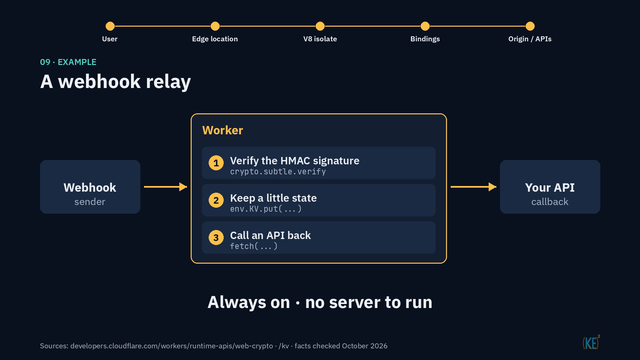
- Verify the sender. The Worker checks the sender’s HMAC signature with Web Crypto, using
crypto.subtle.verify(Web Crypto). Requests that fail the check stop here. - Keep a little state. It records what it needs in a KV binding.
- Call an API back. It passes the result on with
fetch.
It is always on, and there is no server to run. One caution: KV is eventually consistent. If you need strict exactly-once handling, so a repeated webhook is never processed twice, use a Durable Object for that part instead of KV (Durable Objects).
The Short Version
Workers won’t replace every server, and they aren’t meant to. The model is easy to work with once you accept two rules: keep state in bindings, and design for the limits. If a job is small, mostly waits on other systems, and you’d rather not maintain a machine for it, Workers is worth a look.
If you’re working out where a small integration or internal tool should run, we’re glad to talk it through. Get in touch.
References
- How Workers works - Cloudflare Docs
- Languages and Python Workers - Cloudflare Docs
- Handlers - Cloudflare Docs
- Bindings - Cloudflare Docs
- How KV works - Cloudflare Docs
- D1 - Cloudflare Docs
- R2 and R2 S3 API compatibility - Cloudflare Docs
- What are Durable Objects? - Cloudflare Docs
- Queues - Cloudflare Docs
- Wrangler configuration - Cloudflare Docs
- Secrets - Cloudflare Docs
- Real-time logs - Cloudflare Docs
- Limits - Cloudflare Docs
- Pricing - Cloudflare Docs
- node:fs - Cloudflare Docs
- Web Crypto - Cloudflare Docs